UIUX Designer
Green Haus Mobile Application
Overview
Role: UI/UX Designer Context: Mobile house application Duration: July/2021 - September /2021
Personal statement
I was hired as the first and only designer on the team to work closely with developers to build out a mobile application for Blek-scon products. This project consisted of researching, designing, prototyping and at times doing front-end coding to create marketing landing pages. Being the only designer at a small startup taught me a ton of valuable lessons. Most importantly, I figured out how to team up with the CTO, CEO and every one of the specialists to fabricate the most ideal item.
Problem statement
Blek-scon Construction Colony Ltd – a construction company situated in Nigeria needs a new focal lens where their customers can view and purchase their eco-friendly architectural designs, houses, and apartments. They also aim to incorporate the idea of living a sustainable life.
Solution
I set out to create a new design that connects users, the environment sustainable houses and Blek-scon Construction Colony Ltd without leaving out the usability and aesthetics across all corners of the application.
My Role
I led the project and worked on all aspects of the design framework including the visual, UX, and usability tests. I likewise patched up the UX of key pages while a group of developers helped bring my design to life.
Design Process
Empathize with users – Define the problem – Ideate solutions – Prototyping – Testing
Empathize with users
To fully understand the needs and pain points of users, I had to conduct user interviews. This way, I get to understand what they really want and if they will be interested in sustainable houses – thereby avoiding any bias. I interviewed 10 adults between the ages of 30 and 60. I also conducted personal research on houses in Nigeria and how Nigerians have been interested in buying houses as this will help me have a view of the housing world.
Research Questions
-
What will compel you to renovate your house?
-
What application or website do you use when searching for a house?
-
Would you prefer to buy a house without physically meeting the agents?
-
How do you feel about energy consumption in your house?
-
What are your takes on sustainable or environment-friendly houses?
Doing this provided a deeper understanding of the context for our design-thinking meetings. Having answers to these questions also allowed the team to focus on key interactions that would delight the end user based on quantitative and qualitative data.
Competitive Analysis
To further understand the task at hand, I carried out research on other construction companies. Taking note of their designs, and mistakes and focusing on how I could imitate them with a better approach and avoid their mistakes. I checked out their platforms like a prospective user — this helped me pick out the pain points users might have while using these platforms and identify how to create a solution with a better experience.
Pain Points
Three (3) major pain points were identified in the research phase which are:
-
Location
-
Price
-
Accessibility to emergency services
Empathy Map
Design Process
Paper Wireframes
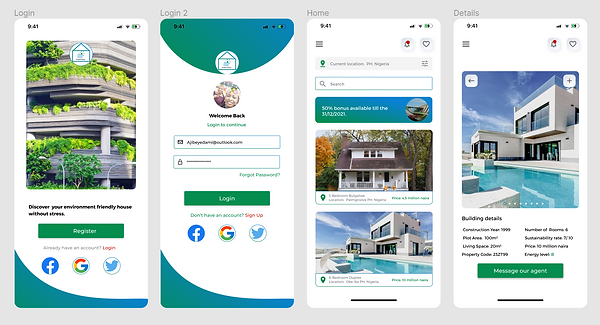
Taking the time out to draft iterations of each screen of the app on paper ensured that the elements that made it to digital wireframes would be appropriate to address user pain points. For the home screen, I prioritized an easy and smooth viewing and searching process to help users perform tasks easily.
NB: More details cannot be revealed because of the Non-Disclosure Agreements I signed with Blek-scon Construction Colony Ltd.
Using the completed set of digital wireframes, I created a low-fidelity prototype. The final design was refined and improved to suit users’ needs and provide an easy navigation process for users.
Usability Testing For High Fidelity Designs
To understand the usability of the app before the High Fidelity designs, I recruited 10 participants to help test out the low-fidelity prototype. Watching the participants interact with the app and listening to their thought processes, helped me pinpoint problem areas. Results were taken note of and an affinity map was created to identify patterns. NB: Testing was done remotely.
Another round of usability testing was conducted using the high-fidelity prototype. By testing the design at this stage, I could observe an interaction that most closely resembles a real-life interaction with the final product. NB: Testing was done remotely.
The booking an appointment stage was confusing to most users as it had a long process to go through before successfully confirming an appointment. After the usability test, I simplified the experience for users by creating a better way to book an appointment.
Final Product
Accessibility Considerations
The main goal was to create a design that puts every user in mind irrespective of their age, diversity, location and other factors. I wanted every user to have similar experiences while using the app. To achieve this, I put a few things in mind which are in the image below.
Takeaways
During the process of this task, I learnt that the first ideas for the app are just the beginning of the process and are not always the best. Usability studies influenced each iteration of the app’s designs. I also learned to overcome my own biases and create a product that is useful to everyone. The application puts users and their needs first.
“Love the application interface and design. Seems highly functional and good choice of palette and imagery” – a review from Engr Reuben Kingsley, the CEO of Bleks-con Construction Colony Ltd.
Future Activities
User experience never ends, I would do the following:
-
Conduct another round of usability studies to confirm if all user pain points have been addressed.
-
Conduct more user research to determine any new areas of need for future updates.
Tools I used:
-
Figma
-
Miro
-
Google Docs
-
Google Slides
-
Google Spreadsheet
-
Zoom (For user interviews)
Other minor projects I designed can be found in the following links
NB: These are the details needed to access the pages
Username: michaela@pellsea.com
Password: 123456